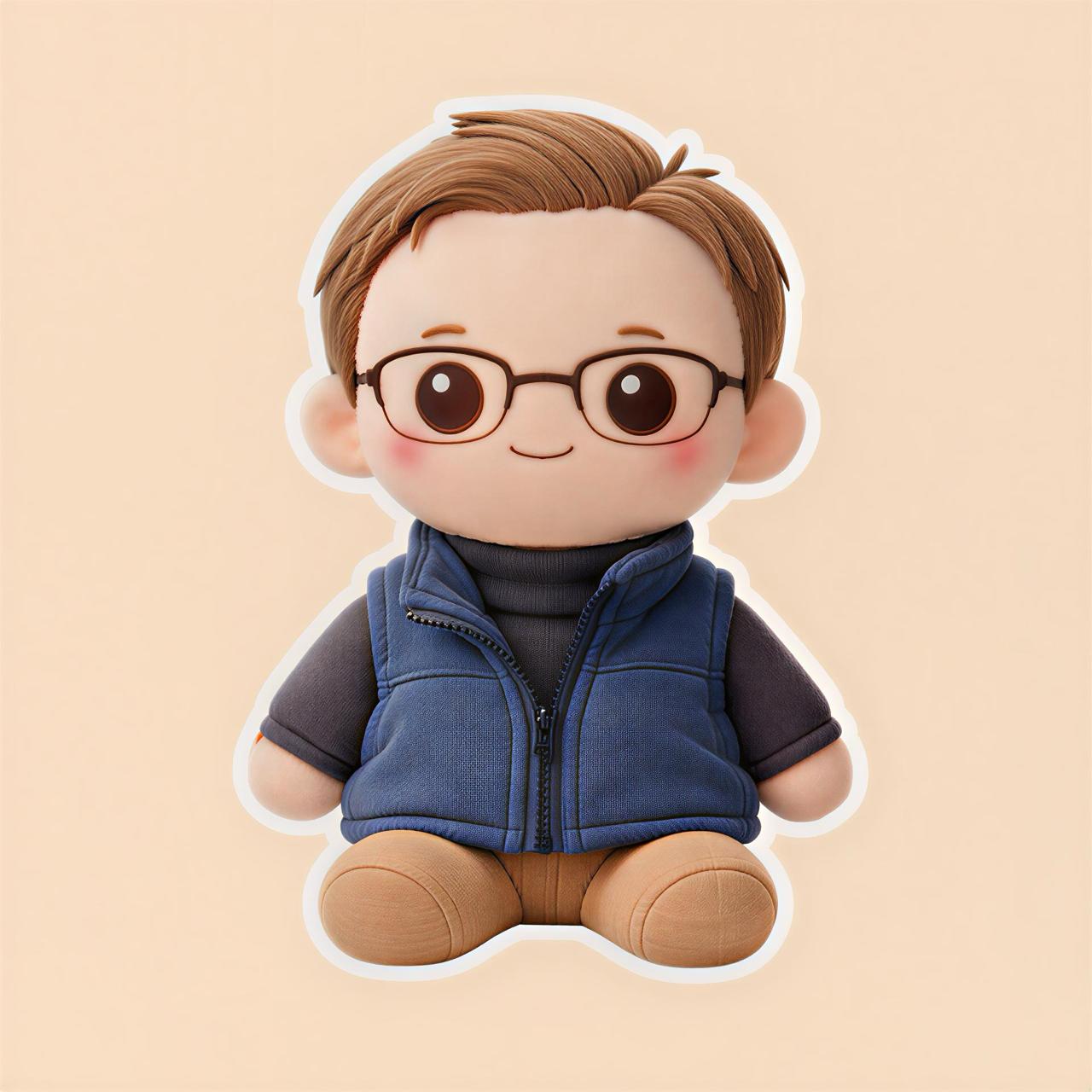
How to Turn a Photo Into a Plush Toy Style Image With AI
Ever looked at a photo of your pet, friend, favorite character, or even yourself and thought, “This would look so cute as a plush toy”?
That is exactly what Plushify is made for.
Plushify is an AI plush generator app that helps you turn normal photos into cute plush-style images. Instead of trying to imagine how something would look as a soft toy, you can upload a photo and quickly create a plush-inspired version.
Want to try it yourself? Use Plushify to upload your photo and turn it into a cute plush-style AI image.
What Does It Mean to Turn a Photo Into a Plush Toy Style Image?
Turning a photo into a plush toy style image means taking the main subject of a picture and recreating it with a soft, stuffed-toy look.
The final result usually looks more:
- Soft
- Cute
- Rounded
- Toy-like
- Fluffy
- Friendly
- Giftable
- Fun to share
For example, you can take a photo of your dog and see what it might look like as a cute stuffed animal. Or you can upload a selfie and create a plush-style version of yourself.
This is not the same as ordering a real physical plush toy. Plushify creates an AI-generated plush-style image that can be used for fun, inspiration, social media, avatars, or gift ideas.
Why Are Plush-Style AI Images So Popular?
Plush-style images are popular because they make almost anything look cuter.
A normal photo can become something soft, playful, and more emotional. This is especially fun for pets, characters, and personal photos because people already feel attached to them.
Some common reasons people use an AI plush generator include:
- To turn a pet photo into a plush-style image
- To create a cute profile picture
- To make fun social media content
- To get inspiration for a custom plush gift
- To see how a character would look as a soft toy
- To create before-and-after AI image posts
- To make something personal feel more adorable
The idea is simple: upload a photo, generate a plush-style version, and see the result.
The Hard Way: Creating a Plush Design Manually
Before tools like Plushify, making a plush-style version of a photo was not easy.
You usually had to:
- Hire an artist
- Learn design software
- Write detailed AI prompts
- Try many different image generators
- Manually edit the result
- Explain the idea to a custom plush maker
That can take time, money, and creative skill.
Even if you use a general AI image tool, you may still need to write a detailed prompt like:
“Turn this photo into a cute soft plush toy with fabric texture, stitched details, rounded proportions, button eyes, and a handmade stuffed animal style.”
And even then, the result may not match what you wanted.
Plushify makes the process easier by focusing on one clear use case: turning photos into plush-style AI images.
Try Plushify if you want a quicker way to create a plush-style version of your photo without complicated prompts.
What Can You Use Plushify For?
Plushify can be used for many fun and creative ideas.
1. Turn Your Pet Into a Plush-Style Image
This is one of the best use cases.
Pets already have cute features, so they often work really well as plush-style images. You can upload a photo of your:
- Dog
- Cat
- Rabbit
- Bird
- Hamster
- Guinea pig
- Other pet
A plush-style pet image can be used as a profile picture, lock screen, social media post, or gift idea.
For best results, choose a clear photo where your pet’s face is easy to see.
2. Create a Plush-Style Version of Yourself
You can also use Plushify with selfies or portrait photos.
A plush-style version of yourself can be a fun alternative to a normal profile picture. It can look cute, soft, and more unique than a basic selfie.
You can use it for:
- TikTok
- Discord
- YouTube
- Gaming profiles
- Personal branding
Try using a clear photo with good lighting and a simple background.
3. Make a Cute Gift Idea
A plush-style image can also help you visualize a gift idea.
For example, you could create a plush-style image of:
- A pet
- A friend
- A partner
- A family member
- A child’s drawing
- A character concept
This can be useful if you are thinking about getting a real custom plush made later. Plushify can help you see the idea visually before taking the next step.
4. Create Fun Social Media Content
Plush-style transformations are easy to understand and fun to share.
You can post content like:
- “I turned my dog into a plush toy”
- “AI made my cat look like a stuffed animal”
- “What I would look like as a plush”
- “Turning my friend into a plush character”
- “Original photo vs plush version”
These before-and-after posts work well because people instantly understand the transformation.
5. Visualize Characters or Mascots as Plush Toys
If you create characters, mascots, stickers, or brand designs, Plushify can help you imagine them as plush-style toys.
This can be useful for:
- Artists
- Small brands
- Game creators
- Mascots designers
- Content creators
- Sticker shops
- Character designers
Instead of only seeing your character as a flat image, you can explore how it might look as something soft and toy-like.
How to Use Plushify
Using Plushify is simple.
Step 1: Choose a Photo
Start with a photo you want to turn into a plush-style image.
Good options include:
- A clear pet photo
- A selfie
- A portrait
- A character image
- A mascot
- A cute object
Try to avoid very blurry, dark, or crowded photos.
Step 2: Upload the Photo
Open Plushify and upload your image.
The better your input image is, the better the plush-style result is likely to be.
Step 3: Generate the Plush-Style Image
Let Plushify create the plush-inspired version of your photo.
The goal is to make the subject look softer, cuter, and more like a stuffed toy while still keeping the main idea of the original image.
Step 4: Save or Share the Result
Once your plush-style image is ready, you can use it for:
- Social media
- Profile pictures
- Gift inspiration
- Creative projects
- Before-and-after posts
- Personal collections
- Fun edits
That is it. No complicated editing software needed.
Tips for Getting Better Plush-Style Results
AI results can vary depending on the photo you upload, so starting with a good image matters.
Here are some simple tips:
- Use a clear photo
- Make sure the subject is easy to see
- Choose good lighting
- Avoid heavy blur
- Use a simple background if possible
- Try close-up photos for pets and people
- Test more than one photo if needed
For pet photos, face-forward images usually work better.
For selfies, use a photo where your face, hair, and clothing are clearly visible.
For character images, choose a clean image with strong shapes and colors.
Why Use Plushify Instead of a Normal AI Image Generator?
General AI image tools can do many things, but they can also feel complicated.
You may need to:
- Write detailed prompts
- Try different styles
- Adjust settings
- Test multiple outputs
- Keep refining the result
Plushify is more focused.
It is designed specifically for people who want to turn photos into plush-style images. That makes it easier if you do not want to spend time learning advanced AI prompting.
Here is the simple difference:
| Method | What It Requires | Best For |
|---|---|---|
| Manual editing | Design skills and time | People who know image editing |
| Hiring an artist | Budget and waiting time | Custom professional artwork |
| General AI tool | Prompt writing and testing | Advanced AI users |
| Plushify | Uploading a photo | Quick plush-style AI images |
If you want a simple way to create a plush-style version of a photo, Plushify is a practical option.
Can Plushify Turn a Pet Into a Plush Toy?
Plushify can help you turn a pet photo into a plush-style AI image.
This is perfect if you want to see your cat, dog, or other pet as a cute stuffed animal-style design.
You can use the result as:
- A cute profile photo
- A lock screen
- A social media post
- A gift concept
- A memory image
- A fun before-and-after transformation
It is a quick way to create something personal and cute from a photo you already have.
Is Plushify Only for Pets?
No. Plushify is not only for pets.
You can try it with:
- People
- Selfies
- Friends
- Couples
- Characters
- Mascots
- Cute objects
- Original artwork
Pets are a strong use case, but any clear image with a recognizable subject can be fun to try.
Turn a Photo Into a Plush Toy Style Image With Plushify
If you want to turn a photo into a plush toy style image, you do not need design skills or complicated prompts.
Plushify gives you a simple way to upload a photo and create a cute plush-style AI result.
Use it for pets, selfies, characters, gift ideas, or social media content.
Try Plushify now and create your own plush-style AI image.
FAQ
What is Plushify?
Plushify is an AI plush generator app that helps you turn photos into cute plush-style images.
Can I turn my pet into a plush-style image?
Yes. You can upload a photo of your pet and use Plushify to create a plush-inspired AI version of it.
Does Plushify create a real physical plush toy?
No. Plushify creates AI-generated plush-style images. You can use the result for fun, social media, inspiration, or as a visual concept.
What kind of photos work best?
Clear, well-lit photos usually work best. Try to use images where the subject is easy to see and not too blurry.
Can I use Plushify for selfies?
Yes. You can upload a selfie or portrait photo and create a plush-style version of yourself.
Can I use the plush-style image on social media?
Yes. Plush-style images can be used for social posts, profile pictures, before-and-after content, and creative ideas.
Is Plushify easy to use?
Yes. Plushify is designed to be simple. Upload a photo, generate the plush-style result, and save or share it.
Final CTA
Ready to see what your photo would look like as a plush toy style image?
Try Plushify now and turn your photo into a cute plush-style AI image.